Secure IMAP incoming configuration
-
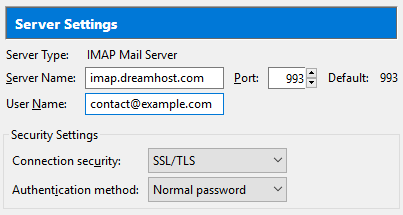
- This example shows the ‘contact@example.com’ user being set up as an IMAP user with SSL enabled using Port 993 for incoming mail.
- The server name being used is ‘imap.dreamhost.com’ with ‘Authentication’ set to ‘Normal password’. Make sure to use your correct mail server name.
Secure outgoing settings
-
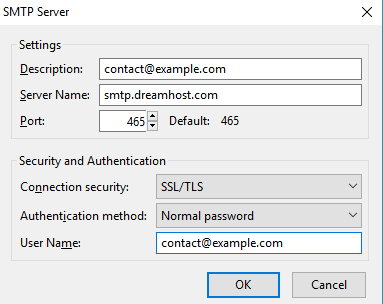
- This setup shows the SMTP settings with SSL enabled for the ‘example@example.com’ email address.
- The user is set to use Port 465 with SSL for secure connections and the ‘Authentication’ is set here as ‘Normal password’.
- The outgoing server name being used is ‘smtp.dreamhost.com’ with ‘Authentication’ set to ‘Normal password’. Make sure to use your correct mail server name.